

Office 365 Login (MS Teams, One Drive, Student WiFi)
Log in here:
MICROSOFT LOGIN CREDENTIALS
USERNAME:
First initial lastname + last 4 digits of their student number @langleyschools.ca
PASSWORD:
Use your school network password.
If you have never changed your password, it defaults to:
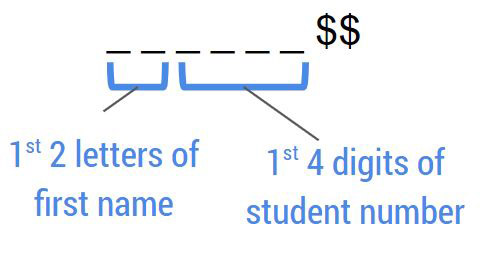
EXAMPLE
JOHN SMITH – #123456
U: jsmith3456@langleyschools.ca
P: jo1234$$
RESET YOUR PASSWORD HERE:
OFFICE 365
Students in School District 35 all have access to download the full Microsoft Office 365 software suite for personal use using their school-supplied credentials.
Many teachers will be choosing to use Microsoft Teams to communicate with students and/or offer video lessons. All students have access to MS Teams through their Office 365 account.
For instructions on how to use OneDrive, please see here
Student Wifi
USERNAME:
Student pupil number.
PASSWORD:
Use your school network password.
If you have never changed your password, it defaults to:
EXAMPLE
JOHN SMITH – #123456
U: 123456
P: jo1234$$